
Product Design User Manual
Overview
The Product Design module is a centralized platform for managing baking product information. Users can add, edit, delete, and view product information, combine basic recipes or materials into final products, and view nutritional information.
Features
1. Product Design Management
Feature Description
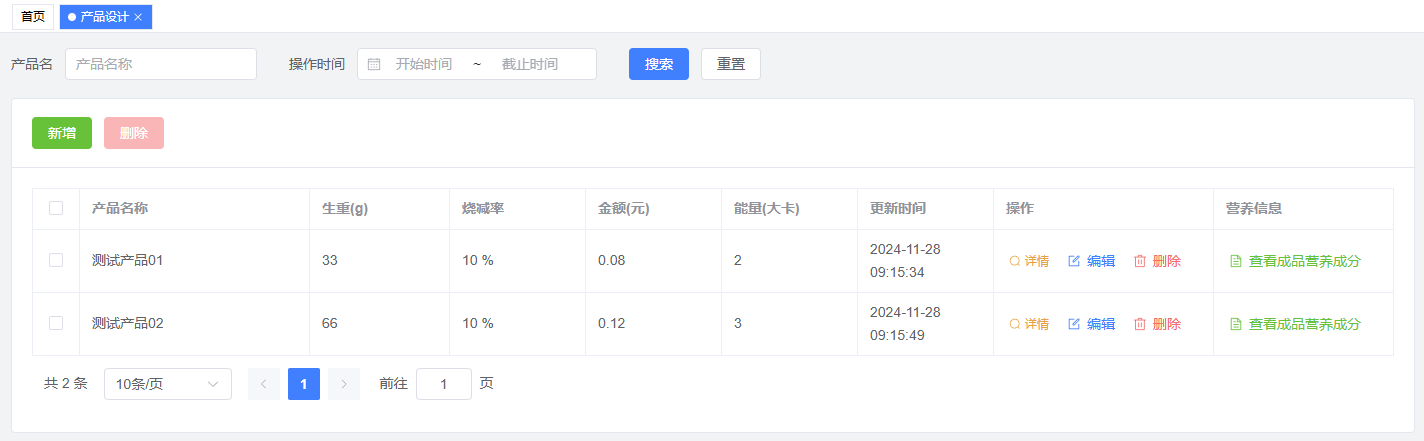
- View product information: including product name, raw weight, baking loss rate, cost, energy, and update time
- Add product information: support creating new product records
- Edit product information: support modifying existing products
- Delete product information: support removing unnecessary products
- Real-time updates: changes are displayed immediately
Operation Guide
View Product List
- Enter the Product Design page to view all product information
- Information is displayed in a table format, including product name, raw weight (g), baking loss rate, cost, etc.
Add New Product
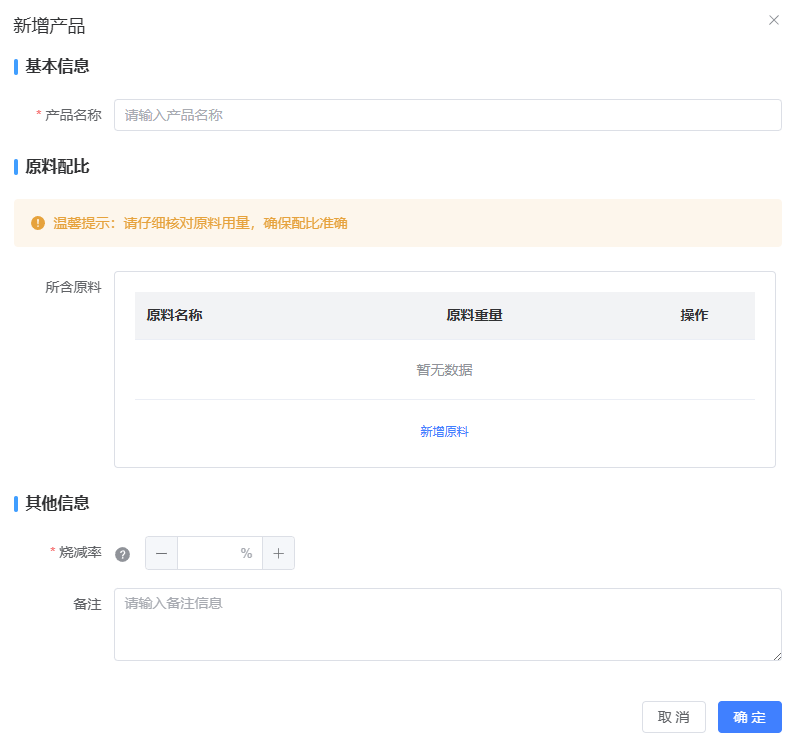
- Click "Add Product" button
- In the pop-up window, fill in:
- Product name
- Select basic recipes or materials
- Enter raw weight and baking loss rate
- Add notes (optional)
- Click "Save" to submit
Edit Product Information
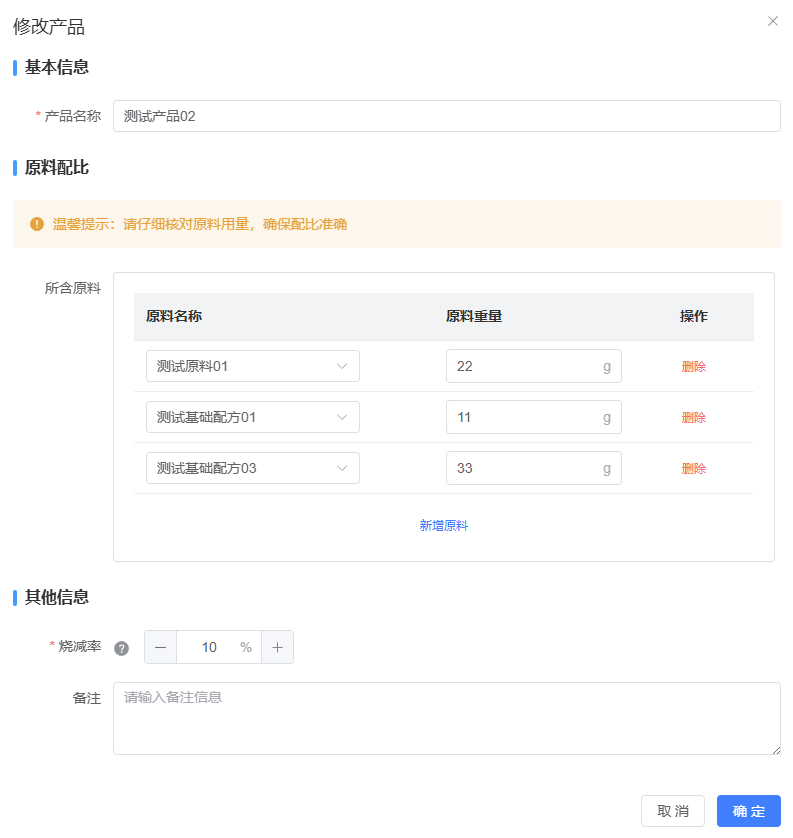
- Click the "Edit" button in the corresponding product row
- Modify information in the pop-up window
- Click "Save" to submit changes
Delete Product Information
- Click the "Delete" button in the corresponding product row
- Click "Confirm" in the confirmation dialog
Operation Tips
- Product name is required
- At least one basic recipe or material must be added
- Raw weight and baking loss rate must be valid numbers
- All modifications can be previewed before saving
- Deletion operations cannot be undone, please proceed with caution
2. Product Details
Feature Description
- View detailed product information
- Display product composition and cost breakdown
- Support real-time calculation of total weight and cost
Operation Guide
- View Details
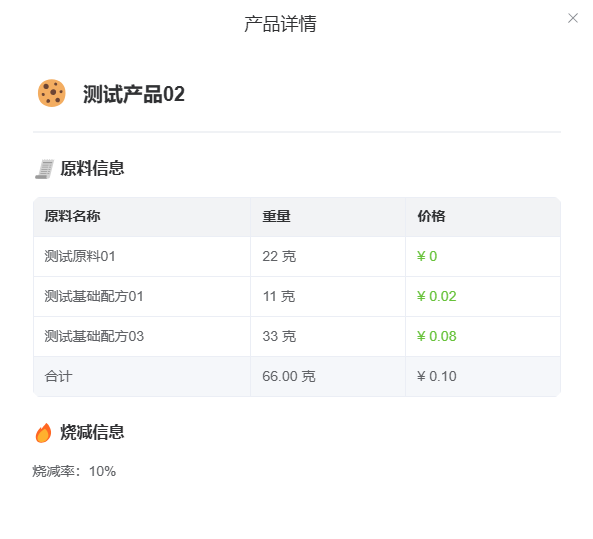
- Click the "View Details" button in the product row
- System displays detailed product information, including:
- Basic product information
- Recipe/material list and quantities
- Cost breakdown
- Total weight and cost
Notes
- Product prices will update automatically when material prices change
- Ensure recipe and material information is complete for accurate calculations
3. Nutrition Facts
Feature Description
- View product nutrition information
- Display energy, protein, fat, and other nutritional data
- Support real-time calculation of nutritional values
Operation Guide
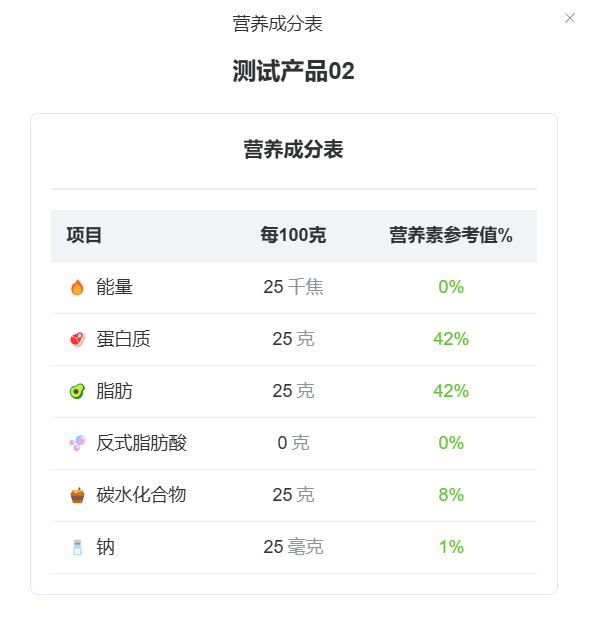
- View Nutrition Facts
- Click the "Nutrition Facts" button in the product row
- System displays product nutrition information, including:
- Energy (kcal)
- Protein content
- Fat content
- Trans fatty acid content
- Carbohydrate content
- Sodium content
Tips
- Nutritional data is automatically calculated based on material nutrition information
- Ensure material nutrition information is complete for accurate nutrition facts
Common Issues
Q1: Why can't I add a product?
A1: Please check:
- All required fields are filled
- At least one recipe or material is added
- Raw weight and baking loss rate are valid numbers
- Network connection is stable
Q2: Why are nutrition facts not showing?
A2: This might be because:
- Material nutrition information is incomplete
- System calculation error
- Temporary display issue (try refreshing)
Q3: How to copy an existing product?
A3: Currently, product copying is not supported. You need to create a new product manually.